Showing posts with label monitor. Show all posts

Saturday, November 8, 2014

Mains Voltage Monitor Circuit Diagram

Many electronics hobbyists will have experienced the following: you try to finish a project late at night, and the mains supply fails. Whether that is caused by the electricity board or your carelessness isn’t really important. In any case, at such times you may find yourself without a torch or with flat batteries. There is no need to panic, as this circuit provides an emergency light. When the mains fails, the mains voltage monitor turns on five super bright LEDs, which are fed from a 9 V battery (NiCd or NiMH) or 7 AA cells. A buzzer has also been included, which should wake you from your sleep when the mains fails.

You obviously wouldn’t want to oversleep because your clock radio had reset, would you? When the mains voltage is present, the battery is charged via relay Re1, diode D8 and resistor R10. D8 prevents the battery voltage from powering the relay, and makes sure that the relay switches off when the mains voltage disappears. R10 is chosen such that the charging current of the battery is only a few milliamps. This current is small enough to prevent over-charging the battery. D6 acts as a mains indicator. When the relay turns off, IC1 receives power from the battery. The JK flip-flops are set via R12 and C4.

Circuit diagram:
Mains
Mains Voltage Monitor Circuit Diagram

This causes T1 and T2 to conduct, which turns on D1-D5 and the buzzer. When the push button is pressed, a clock pulse appears on the CLK input of flip-flop IC1b. The output then toggles and the LEDs turn off. At the same time IC1a is reset, which silences the buzzer. If you press the button again, the LEDs will turn on since IC1b receives another clock pulse. The buzzer remains off because IC1a stays in its reset state. R11, R3 and C3 help to debounce the push button signal. In this way the circuit can also be used as a torch, especially if a separate mains adapter is used as the power supply.

As soon as the mains voltage is restored, the relay turns on, the LEDs turn off and the battery starts charging. The function of R13 is to discharge C4, preparing the circuit for the next mishap. If mains failures are a regular occurrence, we recommend that you connect pairs of LEDs in series. The series resistors should then have a value of 100 ?. This reduces the current consumption and therefore extends the battery life. This proves very useful when the battery hasn’t recharged fully after the last time. In any case, you should buy the brightest LEDs you can get hold of. If the LEDs you use have a maximum current of 20 mA, you should double the value of the series resistors! You could also consider using white LEDs.

Saturday, October 25, 2014

Supply Voltage Monitor Diagram Circuit

A circuit for monitoring supply voltages of ±5 V and ±12 V is readily constructed as shown in the diagram. It is appreciably simpler than the usual monitors that use comparators, and AND gates. The circuit is not intended to indicate the level of the inputs. In normal operation, transistors T1 and T3 must be seen as current sources. The drop across resistors R1 and R2 is 6.3 V (12 –5 –0.7). This means that the current is 6.3mA and this flows through diode D1 when all four voltages are present. However, if for instance, the –5 V line fails, transistor T3 remains on but the base-emitter junction of T2 is no longer biased, so that this transistor is cut off. When this happens, there is no current through D which then goes out.

Supply

Wednesday, September 24, 2014

Monitor voltage and 5VDC and 12VDC Circuit Diagram

This circuit is a voltage monitor which operates on fixed testes ± 5 VDC and ± 12 VDC, and is easily constructed as shown in Fig. It is considerably simpler than the normal display using comparators and AND gates. The circuit is not intended to indicate the level of entries. If one of the testes fail, for example, -5 V line fails, the transistor Q3 remains on but the base-emitter junction of T2 is not, so that this transistor is cut off. When this happens, there is no current through D, which then turns off.

Monitor voltage + and - 5VDC + and - 12VDC Circuit Diagram

Monitor voltage + and - 5VDC + and - 12VDC Circuit Diagram

Mains Voltage Monitor

Many electronics hobbyists will have experienced the following: you try to finish a project late at night, and the mains supply fails. Whether that is caused by the electricity board or your carelessness isn’t really important. In any case, at such times you may find yourself without a torch or with flat batteries. There is no need to panic, as this circuit provides an emergency light. When the mains fails, the mains voltage monitor turns on five super bright LEDs, which are fed from a 9 V battery (NiCd or NiMH) or 7 AA cells. A buzzer has also been included, which should wake you from your sleep when the mains fails.

You obviously wouldn’t want to oversleep because your clock radio had reset, would you? When the mains voltage is present, the battery is charged via relay Re1, diode D8 and resistor R10. D8 prevents the battery voltage from powering the relay, and makes sure that the relay switches off when the mains voltage disappears. R10 is chosen such that the charging current of the battery is only a few milliamps. This current is small enough to prevent over-charging the battery. D6 acts as a mains indicator. When the relay turns off, IC1 receives power from the battery. The JK flip-flops are set via R12 and C4.

Circuit diagram:
mains-voltage-monitor-circuit diagram
Mains Voltage Monitor Circuit Diagram

This causes T1 and T2 to conduct, which turns on D1-D5 and the buzzer. When the push button is pressed, a clock pulse appears on the CLK input of flip-flop IC1b. The output then toggles and the LEDs turn off. At the same time IC1a is reset, which silences the buzzer. If you press the button again, the LEDs will turn on since IC1b receives another clock pulse. The buzzer remains off because IC1a stays in its reset state. R11, R3 and C3 help to debounce the push button signal. In this way the circuit can also be used as a torch, especially if a separate mains adapter is used as the power supply.

As soon as the mains voltage is restored, the relay turns on, the LEDs turn off and the battery starts charging. The function of R13 is to discharge C4, preparing the circuit for the next mishap. If mains failures are a regular occurrence, we recommend that you connect pairs of LEDs in series. The series resistors should then have a value of 100 ?. This reduces the current consumption and therefore extends the battery life. This proves very useful when the battery hasn’t recharged fully after the last time. In any case, you should buy the brightest LEDs you can get hold of. If the LEDs you use have a maximum current of 20 mA, you should double the value of the series resistors! You could also consider using white LEDs.


Author: Goswin Visschers - Copyright: Elektor July-August 2004

A Car Battery Monitor

A close call on the road can really focus your mind on the importance of having a battery monitor in a car. I had been enjoying a pleasant week of travelling around the countryside at a leisurely pace and taking in the beautiful scenery each day. It wasnt until the final day, with the big rush to return home, that I had to drive at night.My home is deep in the country and on the road I was travelling the closest petrol station may be 80km away. I was travelling through an area that is full of open-cut coal mines and large heavily loaded semi-trailers constantly pound the roads, travelling at quite high speeds. It was around 8pm at night and everything was very dark no street lights or house lights anywhere.

Just as I was going up a hill, the lights began to dim and the engine coughed. A large semi-trailer loomed in the rear-vision mirror as I pushed the clutch in and tried to restart. My speed was falling rapidly and my lights were blacked out - I was like a sitting duck in the middle of the road, as the semi-trailer came rapidly bearing down on me. I just managed to pull the car off the road, as the semi-trailer came screaming past, missing me by inches! After calling for assistance from the NRMA, the problem was found to be a fault in the alternator, which was failing to charge the battery. The battery voltage had been falling under the heavy load of the lights and at the worst possible time, there was not sufficient power for the lights or the motor.

After the initial shock wore off, I put on my thinking cap to come up with a PIC-based solution to the problem. What was really needed was a display and a buzzer, to get my attention should the voltage fall outside a specified range. So my design criteria was set, a series of LEDs could indicate the voltage and a buzzer would also be used to warn of problems.
Main Features:
  • Visual indication of battery voltage
  • Audible warning when voltage becomes low
  • Screw terminals for easy connection
  • Simple and easy to build
Circuit details:

The circuit is based on PIC16F819 18-pin microcontroller which has an analog-to-digital (A/D) input to monitor the battery voltage and outputs capable of driving LEDs directly, to keep the component count down. There are seven LEDs in all, giving a good range of voltage indication. The topmost LED, LED1, comes on for voltages above 14V which will occur when the battery is fully charged. LED2 indicates for voltages between 13.5V and 14V while LED3 indicates between 13V and 13.5V. Normally, one of these LEDs will be on. LED4 covers 12.5V to 13V while LED5 covers 12V to 12.5V. LED6 covers from 11.5V to 12V while LED7 comes on for voltages below 11.5V. These two LEDs are backed up by the piezo chime which beeps for voltages between 11.5V and 12V and becomes more insistent for voltages below 11.5V.

That might seem fairly conservative. After all, most cars will start with no troubles, even though the battery voltage might be a touch below 12V, wont they? Well, no. Some modern cars will happily crank the motor at voltages below 11V but their engine management will not let the motor start unless the voltage is above 11V. So dont think that a modern car will always start reliably. This little battery monitor could easily prevent a very inconvenient failure to start! So lets describe the rest of the circuit. The incoming supply is connected via diode D1 which provides protection against reverse polarity while zener diode ZD1 provides protection from spike voltages.

A standard 7805 3-terminal regulator is then used to provide a stable 5V to the microcontroller. The battery voltage is sensed via a voltage divider using 33kΩ and 100kΩ resistors. This brings the voltage down to within the 0-5V range for the A/D input of the PIC16F819. Port B (RB0 to RB7) of the microcontroller is then used to drive the various LEDs, with current limiting provided via the 330Ω resistor network. RB7, pin 13, drives a switching transistor for the piezo buzzer.

Software:
For the software, the design follows the basic template for a PIC microcontroller. Port A and its ADC (analog-to-digital converter) function are set up while port B functions as the output for the LEDs and buzzer. Once the set-up is complete, a reading will be taken at port RA2, the input for the A/D convertor. This reading is then compared with a series of values to determine the range of the voltage. This is similar to a series of "if" statements in Basic language. If the voltage is found to be within a certain range, the relevant port B pin will be turned on. If the voltage is below 12V, the buzzer will be turned on for a brief period, to signal a low battery condition. As the voltage falls below 11.5V, the frequency of the beeps will increase, to signal increased urgency.

Building it:

All the parts are mounted on a small PC board measuring 46 x 46mm (available from Futurlec). The starting point should be the IC socket for the PIC16F819, as this is easiest to mount while the board is bare. The next item can be the PC terminal block. The resistors and capacitors can then follow. Make sure the electrolytics are inserted with correct polarity.

Make sure that you do not confuse the zener (ZD1) with the diode when you are installing them; the diode is the larger package of the two.
 
Even more important, dont get the 78L05 3-terminal regulator and the 2N3906 transistor mixed up; they come in identical packages. The 78L05 will be labelled as such while the 2N3906 will be labelled "3906". And make sure you insert them the correct way around. The buzzer must also be installed with the correct polarity. The 330Ω current limiting resistors are all in a 10-pin in-line package. There are four green LEDs, two yellow and one red. They need to be installed in line and with the correct orientation.

Testing:

Before you insert the PIC16F819 microcontroller, do a voltage check. Connect a 12V source and check for the presence of 5V between pins 14 & 5 OF IC1. If 5V is not present, check the polarity of regulator REG1 and the polarity of the diode D1. If these tests are OK, insert the IC and test the unit over a range of voltage between 9V and 15V. Make sure that all LEDs come on in sequence and the piezo buzzer beeps for voltages below 12V. 

Now it is matter of installing the unit in your car. It is preferable to install the unit in a visible position for the driver. However, it should not obscure any other instruments. The unit should be connected to the cars 12V supply after the ignition switch. This will turn the unit off with the other instruments and prevent battery drain while the motor is not running.


Author :Alan Bonnard Copyright : Silicon Chip Publications Pty Ltd

Simple VGA Monitor Splitter and Extender Circuit Diagram

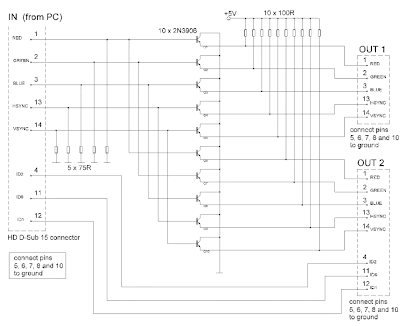
The circuit was designed to provide distribution, extension and splitting of personal computer video output to two or more monitors.
  • Super Video Graphics Array (SVGA) – defined in 1989 as a set of graphic standards that supports 800 X 400 resolution or 480,000 pixels with support for 256 colors or a palette of 16 million colors.
  • Pixel – short for picture element, is the smallest point or single item of information in a graphic image and the basic unit of programmable color on a computer image or computer display.
  • 2N3906 – a common PNP BJT transistor intended for medium voltage, lower current and power, which can operate at moderately high speeds, used for general purpose switching and low-power amplifying applications.
The circuit may also be called as video port expander, multiple monitor, PC video splitter, LCD Y splitter, etc. It provides the same high resolution image to several monitors using a single PC. Each line of the SVGA card of the analog output stage of PC contains 75 ohm impedance being obtained from the signal sources.

The transistors will not contribute as additional loads as they are having very high input impedances. The parameters being shared are the primary colors which consist of Red, Green and Blue, the horizontal synchronization and the vertical synchronization. Since the three ID connections are supposed to be connected to less advance and cheaper monitors, they can be excluded in the circuit.

VGA Monitor Splitter and Extender 

VGA Monitor Splitter and Extender
 The PNP switching transistor 2N3906 forms the emitter-follower mode of ten transistors. They are utilized due to their low current having a maximum of 200 mA, low voltage with a maximum of 40 Volts, low cost, versatile and efficient, although they are not the best possible choice. It is preferable to use faster transistors when dealing with higher pixel rates because high input resistances will be supplied by higher gain.

The resolution entirely dictates the quality of a display system as to how many bits are used to represent each pixel and how many pixels it can display. To prevent RF interference on the circuit, as the monitor operates in radio frequency, a metal casing should enclose the splitter circuit and eventually be connected to ground.

The circuit will require a power supply of 5 Volts and a current around 600 mA. The DC components in the output signals will not be considered as drawbacks since the splitter is working well with 1024×768 15” and 800×600 monitors. The 2N3906 transistor is intended for amplifier functions and high-speed switching in industrial applications. Since there are many standards that have followed, all are employing the standards of SVGA since 1990 which includes the eXtended Graphics Array (XGA) of IBM, Super XGA (SXGA), SXGA+, Ultra XGA (UXGA) and Quad XGA (QXGA).

This video splitter will be suitable for tradeshows, in-store displays or classrooms where high quality video on multiple monitors is need; for support with LCD flat panel monitors and DDC2B protocol; in digital signage applications with perfect resolution; for supporting 1900×1200 resolution without degradation; for burn-in of monitors after repair; and for support of stereo audio as well.