Showing posts with label and. Show all posts

Wednesday, November 19, 2014

Voltmeter and ampere meter using PIC

volt meter and ampere meter with PIC can be used to measure voltage and current simultaneously. The series of volt meter and ampere meter with PIC uses a PIC16F876A as a data processor voltage and current are measured. This circuit uses the LCD 16 × 2, which is used to display data voltage and current measurements. In the article volt meter and ampere meter with PIC are discussed only limited to hardware only. For more details can be seen from the image volt meter and ampere meter with PIC .
 
 
In the circuit volt meter and ampere meter with PIC above used 3 pieces of buttons for setting Calibration measurement data. The circuit is basically working with the source voltage 5VDC. 

Monday, November 17, 2014

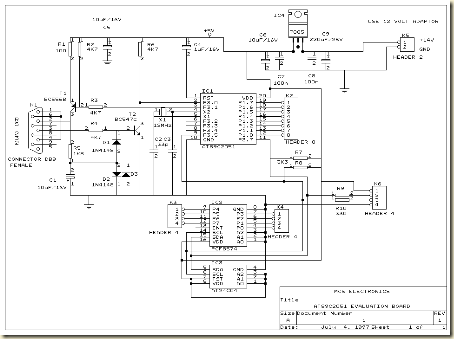
System circuit not Minimum Evaluation Board AT89C2051 and AT89C4051

Maybe we are more familiar with the term Minimum System AT89C2051 circuit, but this time I present a circuit which is not only a series of Minimum System AT89C2051 but more than that.
System

The circuit is more deserves to be called Evaluation Board AT89C2051 and AT89C4051. Some of the advantages of circuit Minimum System AT89C2051 / AT89C2051 and AT89C4051 Evaluation Board which I was present this time, hardware-hardware support below:


RS-232 interface, DB-9
Header for LCD display
I2C, PCF8574 I / O extender
AT24C04, I2C EEPROM

Tuesday, November 4, 2014

Easy Build a Cat and Dog Repeller

Nowadays, just about every house has an outside lamp with a motion sensor. Such a device eliminates the need to feel your way to the front door, and it apparently also scares away intruders. The only problem is that free-running dogs and cats in the neighborhood have little regard for such lamps and continue to deposit their excrement in the garden, once they have found a habitual location there for this purpose. This gave rise to the idea of connecting a sort of siren in parallel with the outside lamp to clearly advise dogs and cats that they are not welcome.

Naturally, it would be nice to avoid startling the entire neighborhood with this alarm signal. Here we can take advantage of the fact that dogs and cats have a significantly better sense of hearing than people. Not only are their ears more sensitive, they can also perceive significantly higher frequencies. With people, the upper limit is around 18 kHz, but dogs and cats can hear frequencies in excess of 20 kHz. We can take advantage of this by building a siren that emits a frequency just above 20 kHz.

Cat and Dog Repeller Circuit diagram :


This will scare off dogs and cats, but people will simply not hear it. All we need for this is an oscillator with an amplifier stage and a tweeter that can reproduce such high frequencies, such as a piezoelectric tweeter. The schematic diagram shows how easily this can be implemented. The power supply for the entire circuit is formed by the components up to and including C2. The 230-V leads are connected in parallel with the motion-sensor lamp. C1 and R1 provide capacitive coupling to reduce the 230 V to an acceptable voltage. 

A DC voltage of approximately 9.1 V is generated from this voltage using a bridge rectifier and D1, filtered and buffered by C2. The oscillator is built around R3, C3 and IC1a.The frequency of this oscillator is rather dependent on the specific characteristics of IC1, so the values shown here should be regarded as guidelines. If the oscillator frequency is too high, it can be reduced by increasing the value of R3 and/or C3.

If the frequency is too low (which means that the siren tone it is audible), the value of R3 and/or C3 should be increased. The square-wave signal from the oscillator is applied to the input of an H bridge composed of several Schmitt triggers in combination with the final output stages (T1–T4). This approach causes the peak-to-peak value of the square wave signal to be twice the supply voltage. As a result, a respectable 18 V is obtained across the piezoelectric tweeter, which is sufficient to produce a quite loud whistle tone. When building the circuit, you should bear in mind that it is directly powered from 230 V and not electrically isolated from the mains network.

It is thus necessary to avoid contact with all of the components when the circuit is in use. In practice, this means that the circuit must be fitted into a well-insulated, waterproof box. If you want to test the circuit, it is a good idea to first discharge C1 using a resistor, since it can hold a dangerous charge. You must also ensure that components F1, C1, R1 and B1 all have a mutual insulation separation of at least 6 mm!


Sunday, November 2, 2014

Tiny Audio Amplifiers Using LM386 and NE5534

Many electronic projects require the use of a small audio amplifier. Be it a radio transceiver, a digital voice recorder, or an intercom, they all call for an audio amp that is small, cheap, and has enough power to provide adequate loudness to fill a room, without pretending to serve a disco! About one Watt RMS seems to be a convenient size, and this is also about the highest power that a simple amplifier fed from 12V can put into an 8 Ohm speaker. A very low saturation amplifier may go as high up as 2 Watt, but any higher power requires the use of a higher voltage power supply, lower speaker impedance, a bridge circuit, or a combination of those.

During my many years building electronic things I have needed small audio amps many times, and have pretty much standardized on a few IC solutions, first and and foremost the LM386, which is small, cheap, and very easy to use. But it does not produce high quality audio... For many applications, the advantages weigh more than the distortion and noise of this chip, so that I used it anyway. In other cases I used different chips, which perform better but need more complex circuits. Often these chips were no longer available the next time I needed a small amplifier.

When I last upgraded my computer, I replaced the old and trusty Soundblaster AWE 32 by a Soundblaster Audigy. The new card is better in many regards, but while the old one had an internal audio power amplifier, the new one doesnt! Thats bad news, because I have some pretty decent speakers for the PC, which are fully passive. So, I built a little stereo amp using two LM386 chips and installed it inside the computer, fed by the 12V available internally.

But then I wasnt satisfied. The LM386 might be suitable for "communication quality" audio, which is roughly the fidelity you get over a telephone, but for music its pretty poor! The distortion was awful. So, the day came when I decided to play a little more scientifically with small audio amps, looking for a way to get good performance with simple and inexpensive means.

I set up a test bench with a sine wave oscillator running at 1 kHz, an 8 Ohm speaker, 12V power supply, and the computer with the soundcard and Fast Fourier Transform software. One channel was connected to the oscillator together with the amplifier input, the other channel to the output and speaker. With this setup I measured the harmonic content of the audio signals. I did the tests at an output level of 0.1W, which is typical for moderately loud sound from a reasonably efficient speaker. Also, I used a music signal from a CD player to test the actual sound of each amplifier.


As already said above, the main attraction of the LM386 is the extreme simplicity of its application circuit. You can even eliminate R1 if the signal source is DC-grounded. If the speaker leads are long, you should add an RC snubber across the output to aid stability. Additionally, if you need higher gain (not necessary if the input is at line level), you can connect a 10uF capacitor between pins 1 and 8. Thats about all there is to it.

Now the bad news: This circuit produced a very high level of distortion! The second harmonic measured just -28dB from the main output. The third harmonic was at -35dB, while the noise level was at -82dB. There were assorted high harmonics at roughly -45dB. With music, the distortion was really disturbing, and also the noise level was uncomfortably high. The power supply rejection is poor, so that some hum and other supply noise gets through. In short, this was a lousy performance!

Since I had used so many LM386s in my projects, I had several different variations. In my material box I found a slightly newer LM386N-1. So I plugged it into my test amplifier. It was even worse! The second harmonic was at -24dB, the third harmonic at -31dB, while the noise was a tad better at -84dB. Folks, thats a total harmonic distortion of almost 7%! And the 0.1W output level at which this was measured is where such a circuit is about at its best...  The distortion can be plainly seen on the oscilloscope, and a visibly distorted waveform is about the most offending thing an audio designer can ever see!

Looking through my projects, I found one where I had used a GL386 chip. This is just a 386 made by another company. I unsoldered it and put it in my test amplifier. Surprise! It was dramatically better, with the second harmonic at -45dB, and the third at -57dB! The noise floor was -84dB, just like the LM386N-1. But even this level of distortion was plainly audible when listening to music. Thats roughly 0.6% THD. Some folks may consider it acceptable for music. I dont, but for communication equipment its fine. At this point, I decided to see if I could build a better amplifier, that doesnt become too complex nor expensive.


This was the first attempt. A low distortion, fast slew rate, but easy to find and rather inexpensive operational amplifier, driving a simple source follower made of two small transistors. These transistors are not biased, so they work at zero quiescent current, in full class B. The only mechanism that works against crossover distortion here is the high slew rate of the OpAmp, which is able to make the distortion bursts during crossover very short. To say the truth, I didnt expect to get usable performance from this circuit, and was really surprised when it worked much better than the 386! The second harmonic was at -77dB, the third at -79dB!

Also there were many high harmonics at roughly -84dB. That means a THD of about 0.015%.  The noise floor was down at the -120dB level! The power supply rejection was excellent, with no detectable feedtrough. Playing music, this amplifier sounded really good: No audible noise, and the distortion could be heard when paying attention to it, but I doubt that the average person would detect it! Not bad, for a bias-less design!

Just to see how important the slew rate of the OpAmp is, I pulled out the NE5534 and replaced it by a humble 741, which is many times slower. The result was dramatic: The second harmonic still good at -70dB, but the third harmonic was much worse, at -48dB. Also there were many high harmonics at the same -48dB level. Given that second harmonic distortion doesnt sound bad to most people, but third harmonic does, and high harmonics are even worse, it came as no surprise that the amplifier with the 741 sounded bad.

At low volume it sounded particularly bad! So I returned to the oscillator and measurement setup, testing at lower output power, and found that while the second and third harmonics followed the output, the high harmonics stayed mostly constant! So, at very low output, the high harmonics became very strong relative to the output. All this is the effect of the slower slew rate of the 741, which makes it less effective correcting the crossover distortion of the unbiased transistors. Interestingly, the noise floor of the 741 circuit wasnt bad: -118dB.

Just for fun, I tried this circuit with a third OpAmp: The TL071, which is good, but not as good as the 5534. The results: Second harmonic at -72dB, third and the high ones at -60dB, and the noise at -120dB. Its interesting that the second harmonic is much more suppressed than the third one. That must be a balancing effect of the symmetric output stage, and the better symmetry in the TL071 compared to other OpAmps.

Its worthwhile to note that this amplifier can be simplified a lot by using a split power supply. R1, R2, C1, C2 and C4 would be eliminated! But then you need the capacitor removed from C4 to bypass the negative supply line. The positive input of the chip goes to ground, while pin 4 and the collector of Q2 go to the negative supply. The rest stays the same. If you use a +-15V supply, the available RMS output power grows to over 10 Watt! Of course, you then need larger transistors. And since larger transistors are slower, the distortion will rise somewhat. An added benefit of a split supply is that the popping noise when switching on and off is eliminated.


As the next experiment, I decided to get rid of the crossover distortion. For this purpose, I added a traditional adjustable bias circuit with a transistor and a trimpot. Now I also had to add a current source, because with the bias circuit there is no single point into which the OpAmp could put its drive current into both bases! I adjusted the bias for the best distortion, and this was really  a good one! The second harmonic was down right where the test oscillator delivered it, about -80dB, so I couldnt really measure it!

The third harmonic was at -84dB, and the best improvement was that the higher harmonics had simply disappeared! They were all below the noise floor, which stayed at -120dB. Actually, this noise floor seems to come from the soundcard A/D converter, so that the actual noise of this and the above amplifier may even be better! With music, this amplifier sounded perfect - clean and smooth. And Im pretty confident that the THD is well below the limits of my measurement setup, which is 0.01%.

The quiescent current was around 10mA. When lowering it to about 3mA, the high harmonics started to rise out of the noise floor. If you want to adjust the bias for the exact best quiescent current, there is a simple trick: Lift R4 from the output, and connect it to pin 6. Now the output stage has been left outside the feedback loop, and all its distortion will show up at the output. Watching the signal on an oscilloscope, or even better on a real time spectrum analyzer (soundcard and software), adjust the trimpot to the lowest distortion level.

Have a current meter in the supply line and make sure that you dont exceed 30mA or so of quiescent current, in order to keep the small transistors cool. But most likely the best distortion will be at a current lower than that. Once the adjustment is complete, return R4 to its normal position. Now the full gain and slew rate of the operational amplifier is used to correct the small remaining cross-over distortion of the output stage, and the distortion will certainly disappear from the scope screen, from your ears, and possibly fall below the detection level of the spectrum analyzer!

This circuit can also be run from a split power supply, by exactly the same mods as for the previous circuit. And since the transistors are properly biased, there isnt any significant distortion increase when using larger transistors. Be sure to use some that have enough gain - you have only a few mA of driving available, and with a +-15V power supply and an 8 Ohm speaker, there can be almost 2A of output current! So, you need a gain of 300 at least. There are power transistors in the 4A class that provide such gain, and these are good candidates. The other option is using Darlington transistors, which far exceed the gain needed here. But they will again increase the distortion, not very much, but perhaps enough to make it audible again.


Source: Humo Luden

Saturday, November 1, 2014

TDA1519C 11W Stereo 22W Mono Power Amp Diagram Circuit

Integrated AF power amps have seen great improvements in recent years offering improved power and easier use. The TDA1519C from Philips contains two power amplifiers providing 11 W per channel stereo or 22 W mono when the two channels are connected in a bridge configuration. The special in-line SIL9P package outline allows the chip to be conveniently bolted to a suitable heatsink. The TDA1519CSP is the SMD version, in this case the heat sink is mounted over, and in contact with, the top surface of the chip.

11W11W Stereo Amplifier Circuit Diagram

The operating voltage of this device is from +6V to +17.5V. The two channels of the amplifier are different in that one channel, between pins 1 and 4, is a non-inverting amplifier, while the other between pins 9 and 6 is an inverting amplifier. It is therefore necessary in stereo operation, to wire the speakers so that one of them has its polarity reversed. Each amplifier has an input impedance of 60kΩ and a voltage gain of 40dB, i.e. 100 times. When both amplifier are used in a bridge configuration, the inputs are in parallel so that the input impedance will be 30kΩ.

22W22W Stereo Amplifier Circuit Diagram

A combined mute/standby function is provided on pin 8. In its simplest form this can be connected to the positive rail via a switch. When the switch is open the amplifier will be in standby mode and current consumption is less than 100µA. When the switch is closed, the amplifier will be operational. A circuit is also shown that uses the mute input to prevent the annoying switch-on plop heard when power amps are first switched on This is caused by the rush of current to charge capacitors C1 and C2.

standbyMute/Standby Switch Circuit Diagram

The circuit shown generates a ramp voltage, which is applied to pin 8. At switch on, as the voltage rises from 3.3 V to 6.4 V, the amplifier will switch out of standby mode and into mute mode allowing C1 and C2 to charge. Only when the ramp voltage on pin 8 reaches 8.5V will the amplifier switch into active mode. Protection built into the TDA1519C would seem to make it almost foolproof. The two outputs can be shorted to either of the supply rails and to each other. A thermal shutdown will prevent overloading and the power supply input is protected against accidental reversal of the supply leads up to 6V

Wednesday, October 29, 2014

Remote Mains Switch Low Voltage Diagram Circuit

This circuit allows a 240V mains appliance to be controlled remotely via low-voltage cabling and a pushbutton switch. The mains appliance (in this case, a light bulb) is switched with a suitably-rated relay. All of the electronics is housed in an ABS box located in proximity to the appliance. The pushbutton switch and plugpack are located remotely and can be wired up with 3-core alarm cable or similar. Cable lengths of 20m or more are feasible with this arrangement. When the switch (S1) is pressed, the input (pin 8) of IC1c is briefly pulled low via the 10mF capacitor, which is initially discharged.

Circuit diagram:
Low-Voltage Remote Mains Switch Circuit Diagram

The output (pin 10) immediately goes high and this is inverted and fed back to the second input (pin 9) via another gate in the quad NAND package (IC1d). In conjunction with the 1MW resistor and 470nF capacitor, IC1d eliminates the effects of contact "bounce" by ensuring that IC1c’s output remains high for a predetermined period. The output from IC1c drives the clock input of a 4013 D-type flip-flop (IC2). The flipflop is wired for a "toggle" function by virtue of the Q-bar connection back to the D input. A 2.2MW resistor and 100nF capacitor improve circuit noise immunity. Each time the switch is pressed, the flipflop output (pin 13) toggles, switching the transistor (Q1) and relay on or off. Note that all mains wiring must be properly installed and completely insulated so that there is no possibility of it contacting the low-voltage side of the circuit.
Author: Bob Hammond - Copyright: Silicon Chip Elecronics

Mouse keyboard Switch Unit Diagram Circuit

Unplugging or re-connecting equipment to the serial COM or PS2 connector always gives problems if the PC is running. Even if you only need to swap a mouse or changeover from a graphics keyboard to a standard keyboard. The chances are that the connected equipment will not communicate with the PC, it will always be necessary to re-boot. If you are really unlucky you may have damaged the PC or the peripheral device. In order to switch equipment successfully it is necessary to follow a sequence. The clock and data lines need to be disconnected from the device before the power line is removed. And likewise the power line must be connected first to the new device before the clock and data lines are re-connected.

This sequence is also used by the USB connector but achieved rather more simply by using different length pins in the connector. The circuit shown here in Figure 1 performs the switching sequence electronically. The clock and data lines from the PC are connected via the N.C. contacts of relay RE2 through the bistable relay RE1 to connector K3. Pressing push-button S1 will activate relay RE2 thereby disconnecting the data and clock lines also while S1 is held down the semiconductor switch IC1B will be opened, allowing the voltage on C4 to charge up through R4. After approximately 0.2 s the voltage level on C4 will be high enough to switch on IC1A, this in turn will switch on T1 energizing one of the coils of the bistable relay RE1 and routing the clock, data and power to connector K2.


When S1 is released relay RE2 will switch the data and clock lines through to the PC via connector K1. It should be noted that the push-button must be pressed for about 0.5s otherwise the circuit will not operate correctly. Switching back over to connector K3 is achieved similarly by pressing S2. The current required to switch the relays is relatively large for the serial interface to cope with so the energy necessary is stored in two relatively large capacitors (C2 and C3) and these are charged through resistors R1 and R6 respectively. The disadvantage is that the circuit needs approximately 0.5 minute between switch-overs to ensure these capacitors have sufficient charge.

The current consumption of the entire circuit however is reduced to just a few milliamps. The PCB is designed to accept PS2 style connectors but if you are using an older PC that needs 9 pin sub D connectors then these will need to be connected to the PCB via flying leads. In this case the mouse driver software configures pin 9 as the clock, pin 1 as the data, pin 8 (CTS) as the voltage supply pin and pin 5 as earth.

Resistors:
R1 = 2kΩ2
R2 = 47kΩ
R3 = 10kΩ
R4 = 4kΩ7
R5 = 1kΩ
R6 = 1kΩ2
Capacitors:
C1 = 10µF 10V radial
C2 = 1000µF 10V radial
C3 = 2200µF 10V radial
C4 = 2µF2 10V radial
Semiconductors:
D1-D5 = 1N4148
T1 = BC547
IC1 = 4066 or 74HCT4066
Miscellaneous:
RE1 = bistable relay 4 c/o contacts
RE2 = monostable relay 2 c/o contacts
K1,K2,K3 = 6-way Mini-DIN socket (pins at 240°, PCB mount
S1,S2 = push-button (ITTD6-R)

Petrol Gas Switch For A Pajero Diagram Circuit

My current vehicle, a Pajero, was modified for dual fuel - ie, petrol and gas. However, its necessary to run the vehicle on petrol at regular intervals to stop the injectors from clogging up. This simple circuit allows the vehicle to be started using petrol and then automatically switches it to gas when the speed exceeds 45km/h and the brake pedal is pressed. Alternatively, the vehicle may be run on petrol simply by switching the existing petrol/gas switch to petrol. You can also start the vehicle on gas by pressing the brake pedal while starting the vehicle. The circuit is based on an LM324 dual op amp, with both op amps wired as comparators. It works like this: IC1a buffers the signal from the vehicles speed sensor and drives an output filter network (D1, a 560kO resistor and a 10µF capacitor) to produce a DC voltage thats proportional to the vehicles speed.

Circuit diagram:

This voltage is then applied to pin 5 of IC1b and compared with the voltage set by trimpot VR1. When pin 7 of IC1b goes high, transistor Q1 turns on. This also turns on transistor Q2 when the brake pedal is pressed (pressing the brake pedal applies +12V from the brake light circuit to Q2s emitter). And when Q2 turns on, relay 1 turns on and its contacts switch to the gas position. Trimpot VR1 must be adjusted so that IC1bs pin 7 output switches high when the desired trigger speed is reached (ie, 45km/h). In effect, the speed signal is ANDed with the brake light signal to turn on the relay. The vehicle has been running this circuit for several years now and is still running well, with no further injector cleans required.
Author: J. Malnar - Copyright: Silicon Chip Electronics

Monday, October 27, 2014

Mini Guitar Bass Amplifier Diagram Circuit

Output power: 6W into 4 Ohm load, FET input stage - Passive Tone Control
Tiny, portable Guitar Amplifiers are useful for practice on the go and in bedroom/living room environment. Usually, they can be battery powered and feature a headphone output. This project is formed by an FET input circuitry, featuring a High/Low sensitivity switch, followed by a passive Tone Control circuit suitable to Guitar or Bass. After the Volume control, a 6W IC power amplifier follows, powered by a 12-14V dc external supply Adaptor or from batteries, and driving a 4 Ohm 10 or 13cm (4"/5") diameter car loudspeaker. Private listening by means of headphones is also possible.

Circuit diagram:Mini
Mini Guitar-Bass Amplifier Circuit Diagram
Parts:

P1______________1M Linear Potentiometer
P2____________100K Log Potentiometer
R1_____________68K 1/4W Resistor
R2____________470K 1/4W Resistor
R3______________2K7 1/4W Resistor
R4______________8K2 1/4W Resistor
R5____________680R 1/4W Resistor
R6____________220K 1/4W Resistor
R7_____________39R 1/4W Resistor
R8______________2R2 1/4W Resistor
R9____________220R 1/4W Resistor
R10_____________1R 1/4W Resistor
R11___________100R 1/2W Resistor
R12_____________1K5 1/4W Resistor
C1____________100pF 63V Polystyrene or Ceramic Capacitor
C2,C5,C9,C14__100nF 63V Polyester Capacitors
C3____________100µF 25V Electrolytic Capacitor
C4_____________47µF 25V Electrolytic Capacitor
C6______________4n7 63V Polyester Capacitor
C7____________470pF 63V Polystyrene or Ceramic Capacitor
C8______________2µ2 25V Electrolytic Capacitor
C10___________470µF 25V Electrolytic Capacitor
C11____________22nF 63V Polyester Capacitor
C12__________2200µF 25V Electrolytic Capacitor
C13__________1000µF 25V Electrolytic Capacitor
D1______________3mm red LED
Q1____________BF245 or 2N3819 General-purpose N-Channel FET
IC1_________TDA2003 10W Car Radio Audio Amplifier IC
SW1,SW2________SPST toggle or slide Switches
J1____________6.3mm Mono Jack socket
J2____________6.3mm Stereo Jack socket (switched)
J3_____________Mini DC Power Socket
SPKR__________4 Ohm Car Loudspeaker 100 or 130mm diameter

Notes:
  • Connect the output Plug of a 12 - 14V dc 500mA Power Supply Adaptor to J3
  • Please note that if the voltage supply will exceed 18V dc the IC will shut down automatically
Technical data:

Output power (1KHz sinewave):
6W RMS into 4 Ohm at 14.4V supply
Sensitivity:
50mV RMS input for full output
Frequency response:
25Hz to 20kHz -3dB with the cursor of P1 in center position
Total harmonic distortion:
0.05 - 4.5W RMS: 0.15% 6W RMS: 10%

Tone Control Frequency Response:

Sunday, October 26, 2014

LM2876 40W audio power amplifier Diagram Circuit

Using the LM2876 high-performance audio power amplifier circuit can be designed a very simple high efficiency power audio amplifier electronic project capable of delivering 40W of continuous average power to an 8Ω load with 0.1% THD+N from 20Hz–20kHz.
The performance of the LM2876 high-performance audio power amplifier, utilizing its Self Peak Instantaneous Temperature (°Ke) (SPiKe™) protection circuitry, puts it in a class above discrete and hybrid amplifiers by providing an inherently, dynamically protected Safe Operating Area (SOA). SPiKe protection means that these parts are completely safeguarded at the output against overvoltage, undervoltage, overloads, including shorts to the supplies, thermal runaway, and instantaneous temperature peaks.
The LM2876 maintains an excellent signal-to-noise ratio of greater than 95dB (min) with a typical low noise floor of 2.0μV.

As you can see in the circuit diagram , this 40W high-performance audio power amplifier electronic project require few external electronic parts and require few knowledge .
The muting function of the LM2876 allows the user to mute the music going into the amplifier by drawing less than 0.5 mA out of pin 8 of the device.
Upon system power-up the under-voltage protection circuitry allows the power supplies and their corresponding caps to come up close to their full values before turning on the LM2876 such that no DC output spikes occur.
The LM2876 contains overvoltage protection circuitry that limits the output current to approximately 4Apeak while also providing voltage clamping, though not through internal clamping diodes.
The LM2876 has a sophisticated thermal protection scheme to prevent long-term thermal stress to the device. When the temperature on the die reaches 165°C, the LM2876 shuts down. It starts operating again when the die temperature drops to about 155°C
The LM2876 high-performance audio power amplifier circuit operates over a wide input voltage range , from 20 up to 70 volts , but typically a dual 30 volt power supply ( or a single 60 volt in this case ) will be work fine

Saturday, October 25, 2014

Supply Voltage Monitor Diagram Circuit

A circuit for monitoring supply voltages of ±5 V and ±12 V is readily constructed as shown in the diagram. It is appreciably simpler than the usual monitors that use comparators, and AND gates. The circuit is not intended to indicate the level of the inputs. In normal operation, transistors T1 and T3 must be seen as current sources. The drop across resistors R1 and R2 is 6.3 V (12 –5 –0.7). This means that the current is 6.3mA and this flows through diode D1 when all four voltages are present. However, if for instance, the –5 V line fails, transistor T3 remains on but the base-emitter junction of T2 is no longer biased, so that this transistor is cut off. When this happens, there is no current through D which then goes out.

Supply

Saturday, October 18, 2014

with ICL7107 Voltmeter Diagram Circuit

This is volt meter with ICL7107(Analogue to Digital Converter). It has been designed as a panel meter and can be used in DC power supplies or anywhere else it is necessary to have an accurate indication of the voltage present.

Source:macoprojects Schematic: Voltmeter with ICL7107

Wednesday, September 24, 2014

Monitor voltage and 5VDC and 12VDC Circuit Diagram

This circuit is a voltage monitor which operates on fixed testes ± 5 VDC and ± 12 VDC, and is easily constructed as shown in Fig. It is considerably simpler than the normal display using comparators and AND gates. The circuit is not intended to indicate the level of entries. If one of the testes fail, for example, -5 V line fails, the transistor Q3 remains on but the base-emitter junction of T2 is not, so that this transistor is cut off. When this happens, there is no current through D, which then turns off.

Monitor voltage + and - 5VDC + and - 12VDC Circuit Diagram

Monitor voltage + and - 5VDC + and - 12VDC Circuit Diagram

Simple VGA Monitor Splitter and Extender Circuit Diagram

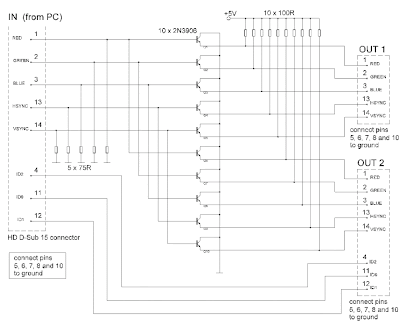
The circuit was designed to provide distribution, extension and splitting of personal computer video output to two or more monitors.
  • Super Video Graphics Array (SVGA) – defined in 1989 as a set of graphic standards that supports 800 X 400 resolution or 480,000 pixels with support for 256 colors or a palette of 16 million colors.
  • Pixel – short for picture element, is the smallest point or single item of information in a graphic image and the basic unit of programmable color on a computer image or computer display.
  • 2N3906 – a common PNP BJT transistor intended for medium voltage, lower current and power, which can operate at moderately high speeds, used for general purpose switching and low-power amplifying applications.
The circuit may also be called as video port expander, multiple monitor, PC video splitter, LCD Y splitter, etc. It provides the same high resolution image to several monitors using a single PC. Each line of the SVGA card of the analog output stage of PC contains 75 ohm impedance being obtained from the signal sources.

The transistors will not contribute as additional loads as they are having very high input impedances. The parameters being shared are the primary colors which consist of Red, Green and Blue, the horizontal synchronization and the vertical synchronization. Since the three ID connections are supposed to be connected to less advance and cheaper monitors, they can be excluded in the circuit.

VGA Monitor Splitter and Extender 

VGA Monitor Splitter and Extender
 The PNP switching transistor 2N3906 forms the emitter-follower mode of ten transistors. They are utilized due to their low current having a maximum of 200 mA, low voltage with a maximum of 40 Volts, low cost, versatile and efficient, although they are not the best possible choice. It is preferable to use faster transistors when dealing with higher pixel rates because high input resistances will be supplied by higher gain.

The resolution entirely dictates the quality of a display system as to how many bits are used to represent each pixel and how many pixels it can display. To prevent RF interference on the circuit, as the monitor operates in radio frequency, a metal casing should enclose the splitter circuit and eventually be connected to ground.

The circuit will require a power supply of 5 Volts and a current around 600 mA. The DC components in the output signals will not be considered as drawbacks since the splitter is working well with 1024×768 15” and 800×600 monitors. The 2N3906 transistor is intended for amplifier functions and high-speed switching in industrial applications. Since there are many standards that have followed, all are employing the standards of SVGA since 1990 which includes the eXtended Graphics Array (XGA) of IBM, Super XGA (SXGA), SXGA+, Ultra XGA (UXGA) and Quad XGA (QXGA).

This video splitter will be suitable for tradeshows, in-store displays or classrooms where high quality video on multiple monitors is need; for support with LCD flat panel monitors and DDC2B protocol; in digital signage applications with perfect resolution; for supporting 1900×1200 resolution without degradation; for burn-in of monitors after repair; and for support of stereo audio as well.