Showing posts with label 2. Show all posts

Friday, November 14, 2014

STABILIZED POWER SUPPLY 3 30 V 2 5 A

This is a versatile power supply that will solve most of the supply problems arising in the everyday work of any electronics workshop. It covers a wide range of voltages being continuously variable from 30 V down to 3 V. The output current is 2.5 A maximum, more than enough for most applications. The circuit is completely stabilised even at the extremes of its output range and is fully protected against short-circuits and overloading.

Circuit Diagram


Working

The power supply is using a well known and quite popular VOLTAGE STABILIZER IC the LM 723. The IC can be adjusted for output voltages that vary continuously between 2 and 37 VDC and has a current rating of 150 mA which is of course too low for any serious use. In order to increase the current handling capacity of the circuit the output of the IC is used to drive a darlington pair formed by two power transistors the BD 135 and the 2N 3055. The use of the transistors to increase the maximum current output limits the range of output voltages somewhat and this is why the circuit has been designed to operate from 3 to 30 VDC. The resistor R5 that you see connected in series with the output of the supply is used for the protection of the circuit from overloading. If an excessively large current flows through R5, the voltage across it increases and any voltage greater than 0.3 V across it has as a result to cut the supply off, thus effectively protecting it from overloads. This protection feature is built in the LM 723 and the voltage drop across R5 is sensed by the IC itself between pins 2 and 3. At the same time the IC is continuously comparing the output voltage to its internal reference and if the difference exceeds the designer’s standards it corrects it automatically. This ensures great stability under different loads. The potentiometer P1 is used to adjust the out put voltage at the desired level. If the full range from 3 to 30 V is desired then you should use a mains transformer with a secondary winding having a rating of at least 24 V/3 A. If the maxi mum voltage output is not desired you can of course use a transformer with a lower secondary voltage output. (However, once rectified the voltage across the capacitor C2 should exceed by 4-5 volts the maximum output expected from the circuit.

Parts List

Resistors
R1 = 560R 1/4W
R2 = 1,2 K 1/4W
R3 = 3,9 K 1/4W
R4 = 15K 1/4W
R5 = 0,15R 5W 

Capacitors
C1 = 100nF
C2 = 2200uF 35-40V
C3 = 100 pF
C4 = 100uF/ 35V

Miscellaneous
D = B40 C3300/2200, 3A Rectifier Bridge
P1 = 10K Potentiometer
TR1 = BD 135
TR2 = 2N3055
IC = LM723

BD 135


2N3055


LM723

Friday, October 31, 2014

2 Siren Sound Use IC555

2 Siren Sound Use IC555
Function of the Two Siren Sound Circuit that is using IC 555. Siren Circuit is separated into three parts: low frequency production. The manufacturing shrill frequency and annex of production low frequency is obtained from IC1 connected to astable multi vibrator circuit frequency is prearranged by R1, C2 frequencies with the purpose of are advent revealed of pin 3 is almost 1 Hz through R2 to subsist noble 5. of IC2, a division manufacture high-frequency input next to Pin 5 pray tone the origin of oscillator IC2 is the move of voltage from the output of IC1 frequency of IC2 is being set by R3, C3, which, if C3 help. will be alive very low tone if C3 is a lesser amount of treble The output preference suffer to podium out at home three legs of IC2 to stimulate B of Q1 to amplify signals to drive speakers.

Monday, October 27, 2014

2 x 22W BTL Car Audio Amplifier DA1553CQ

This is a 22 Watt car stereo audio amplifier. The circuit is based by a single IC TDA1553 with a few peripheral components, this IC hope against hope code name your stereo car audio classification. The IC TDA1553CQ contains 2×22 W amplifiers with differential input stages and can exist used in favor of connection applications.. The expansion of apiece amplifier is fixed by the side of 26 dB. The device is primarily residential for car broadcasting applications.

Circuit Diagram 2 x 22W-BTL Car Audio Amplifier Using DA1553CQ

Circuit Diagram 2 x 22W-BTL Car Audio Amplifier Using TDA1553CQ 
  • The TDA1553CQ IC have got to be present fitted with adequately sized cook sinks.
  • unite a 10K POT happening string with the input because volume control if you need. Not publicized in circuit diagram.
  • employment 12V DC in favor of powering the circuit.


What time a diminutive-circuit to ground occurs, which forces a DC voltage across the loudspeaker of >= vs., a built-in protection circuit becomes full of life and limits the DC voltage across the loudspeaker to <= vs.. pin 12 detects the status of the protection circuit (e.g. meant for diagnostic purposes).

If slightly output is unfriendly-circuited to ground in the course of the side with mode, it becomes hopeless to switch the circuit to the mute otherwise operating condition. happening this event the supply current determination remain some degree of to a little milliamps.

Fuse Failure Alarm 2 LED

This circuit motivation let somebody see the performance of the equipment,otherwise Check the fuse arrived the circuit.The circuit is insignificant and the power supply voltage of all kinds. It parade with LED, 2-color in single. Which is cathode normal kind,the anode has two separate terminals. If the circuit is functioning accurately LED, it exposed in environmentally friendly colour.


The display is red, at what time the fuse voguish the circuit is damaged.The resistor R1 limits the current to stream through the LED is going on for 2 mA.This is a sufficient amount to do the LED light.If it lowers the R1 down, the LED light up. In the regular action of the circuit and The fuse is not damaged. The zener diode to prevent the green and red LED light up at once.Zener diode prevents the LED is sea green and red illumination at the same time. The high-pitched efficiency LED, whilst connected in the sphere of congruence. The red LED uses high-pressure, so with the intention of single green LED illumination up only. Diodes D3 and D4 command prevent perilous in support of the LED. While the semi cycle denial voltage of the alternating current voltage.However, if the DC supply voltage.I perform not include to application diode protection.

Wednesday, September 24, 2014

How to Build 1 2 30V 1 5A Variable Regulated Power supply Circuit


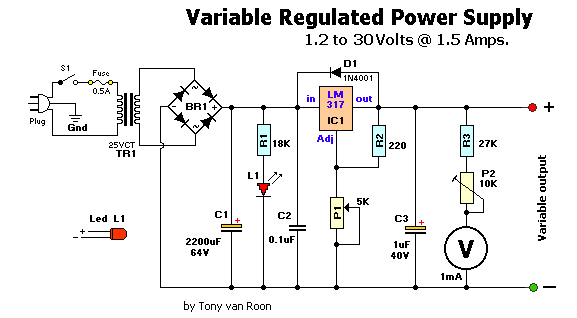
How to Build 1.2-30V/1.5A Variable Regulated Power supply, This is simple 1.2-30V/1.5A variable regulated power supply circuit diagram The 110V-AC coming from the powercord is fed to the transformer TR1 via the on-off switch and the 500mA fuse. The 30vac output (approximately) from the transformer is presented to the BR1, the bridge-rectifier, and here rectified from AC (Alternating Current) to DC (Direct Current). If you dont want to spend the money for a Bridge Rectifier, you can easily use four general purpose 1N4004 diodes. The pulsating DC output is filtered via the 2200µF capacitor (to make it more manageable for the regulator) and fed to IN-put of the adjustable LM317 regulator (IC1). The output of this regulator is your adjustable voltage of 1.2 to 30volts varied via the Adj pin and the 5K potmeter P1. The large value of C1 makes for a good, low ripple output voltage.

 1.2-30V/1.5A Variable Regulated Power supply Circuit Diagram

1.2-30V/1.5A Variable Regulated Power supply Circuit


Why exactly 1.2V and not 0-volt? Very basic, the job of the regulator is two-fold; first, it compares the output voltage to an internal reference and controls the output voltage so that it remains constant, and second, it provides a method for adjusting the output voltage to the level you want by using a potentriometer. Internally the regulator uses a zener diode to provide a fixed reference voltage of 1.2 volt across the external resistor R2. (This resistor is usually around 240 ohms, but 220 ohms will work fine without any problems). Because of this the voltage at the output can never decrease below 1.2 volts, but as the potentiometer (P1) increases in resistance the voltage accross it, due to current from the regulator plus current from R2, its voltage increases. This increases the output voltage.

D1 is a general purpose 1N4001 diode, used as a feedback blocker. It steers any current that might be coming from the device under power around the regulator to prevent the regulator from being damaged. Such reverse currents usually occur when devices are powered down.

The ON Led will be lit via the 18K resistor R1. The current through the led will be between 12 - 20mA @ 2V depending on the type and color Led you are using. C2 is a 0.1µF (100nF) decoupler capacitor to filter out the transient noise which can be induced into the supply by stray magnetic fields. Under normal conditions this capacitor is only required if the regulator is far away from the filter cap, but I added it anyway. C3 improves transient response. This means that while the regulator may perform perfectly at DC and at low frequencies, (regulating the voltage regardless of the load current), at higher frequencies it may be less effective. Adding this 1 µF capacitor should improve the response at those frequencies.

R3 and the trimmer pot (P2) alows you to zero your meter to a set voltage. The meter is a 30Volt type with an internal resistance of 85 ohms. I you have or obtained a meter with a different Ri (internal resistance) you will have to adjust R3 to keep the current of meter to 1mA. Just another note in regards this meter, use the reading as a guideline. The reading may or may not be off by about 0.75volts at full scale, meaning if your meter indicates 30 volts it may be in reality almost 31 volts or 29 volts. If you need a more precies voltage, then use your multimeter.


Construction:
Because of the few components you can use a small case but use whatever you have available. I used a power cord from a computer and cut the computer end off. All computer power cords are three-prong. The ground wire, which is connected to the middle pin of the power plug is connected to the chassis. The color of the ground-wire is either green or green/yellow. It is there for your protection if the 110vac accidentally comes in contact with the supply housing (case). BE CAREFUL always to disconnect the powerplug when you working inside the chassis. If you choose to use an in-line, or clip-type fuseholder be sure to isolate it with heat shrink or something to minimize accidental touching.

I use perf-board (or Vero board) as a circuit board. This stuff is widely available and comes relatively cheap. It is either made of some sort of fiber material or Phenolic or Bakelite pcb. They all work great. Some Phenolic boards come with copper tracks already on them which will make soldering the project together easier.

I mounted the LM317(T) regulator on a heatsink. If you use a metal/aluminum case you can mount it right to the metal case, insulated with the mica insulator and the nylon washer around the mounting screw. Note that the metal tab of the LM317 is connected internally to the Output pin. So it has to be insulated when mounting directly to the case. Use heat sink compound (comes in transparent or white color) on the metal tab and mica insulator to maximize proper heat transfer between LM317 and case/ or heatsink.

Drill the holes for the banana jacks, on/off switch, and LED and make the cut-out for the meter. It is best to mount everything in such a way that you are able to trouble-shoot your circuit board with ease if needed. One more note about the on-off switch S1, this switch has 110VAC power to it. After soldering, insulate the bare spots with a bit of silicon gel. Works great and prevents electrical shock through accidental touching.

If all is well, and you are finished assembling and soldering everything, check all connections. Check capacitors C1 & C3 for proper polarity (especially for C1, polarity reversal may cause explosion). Hookup a multimeter to the power supply output jacks. Set the meter for DC volts. Switch on S1 (led will light, no smoke or sparks?) and watch the meter movement. Adjust the potentiometer until it reads on your multimeter 15Volts. Adjust trimpot P2 until the meter also reads 15volts. When done, note any discrepancies between your multimeter and the power supply meter at full scale (max output). Maybe there is none, maybe there is a little, but you will be aware of it. Good luck and have fun building!


Parts List

BR1 = Bridge Rectifier, 100V - 3A       C1 = 2200 µF, 63V
IC1 = LM317, adjustable regulator       C2 = 0.1 µF
  V = Meter, 30V, Ri = 85 ohm           C3 = 1µF, 40V
TR1 = Transformer, 25V, 2A            Plug = 3-wire plug & cord
 R1 = 18K, 5%                           S1 = On-Off toggle switch
 R2 = 220 ohm, 5%                       D1 = 1N4001
 R3 = 27K, 5%                         Fuse = 110V, 500mA, slow-blow
 P1 = 5K, potentiometer               FuseHolder, wire, solder, case, knob for P1
 P2 = 10K, 10-turn trim-pot           Red & Black Banana Jacks

Notes:  
This is a simple, but low-ripple powersupply, and an excellent project if youre starting out in electronics. It will suit your needs for most of your bench testing and prototype applications. The output is adjustable from 1.2 volts to about 30 volts. Maximum current is about 1.5 amps which is also sufficient for most of your tinkering. It is relatively easy to build and can be pretty cheap if you have some or all the required parts. A printed circuit board is not included and Im not planning on adding one since the whole thing can easily be build on perferated or vero board. Or buy one of Radio Shack/Tandys experimentors boards (#276-150). Suit yourself. The meter and the transformer are the money suckers, but if you can scrounge them up from somewhere it will reduce the cost significantly. BR1 is a full-wave bridge rectifier. The two ~ denotes AC and are connected to the 25vac output coming from the transformer. IC1 is a 3-pin, TO-220 model. Be sure to put a cooling rib on IC1, at its max 1.5 A current it quickly becomes very hot..

All the parts can be obtained from your local Radio Shack or Tandy store. The physical size of the power supply case depends largely on the size of the meter & transformer. But almost anything will do. Go wild.


Sourced By  Tony  van roon

DC 2 Audio Amplifier

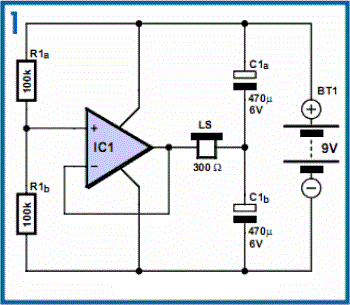
DC- 2 Audio Amplifier Circuit Diagram. Modelss for audio amplifiers with DC coupling to the load are not often encountered these days, even though they offer definite advantages. One advantage is that there is no need for the complication of a second (symmetric) power supply; another is good frequency and phase response. Also, no special electrolytic capacitors are needed for voltage stabilisation, and switch-on ‘thump’ is much reduced. To try to rescue this class of circuit from obscurity the author has designed a headphone amplifier working along the lines illustrated in Figure 1.
.
Circuit diagram

DC- 2 Audio Amplifier
DC-Coupled Audio Amplifier Circuit Diagram

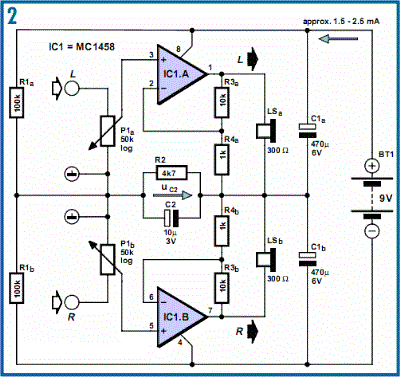
It consists of a voltage divider, a voltage follower and the loudspeaker in the headphones, whose other side is connected to the junction of two electrolytic capacitors, providing the virtual earth. The potential at this point is, of course, half the supply voltage. All we need to do now is suitably couple in the audio signal to be amplified. Figure 2 shows a practical realisation of this idea in the form of a stereo headphone amplifier. The amplifier itself consists of IC1 and P1, R3 and R4 (giving a gain of 11).
.
Circuit diagram:


DC- 2 Audio Amplifier 1
DC Coupled Audio Amplifier Circuit Diagram

This part of the circuit demands no further explanation, and the same goes for the voltage divider mentioned above, formed by R1a and R1b. The signal is coupled in via the potentiometers. C2 and R2 have a special purpose: C2 connects the bottom end of the potentiometers (ground for the input signal) to the virtual earth. However, this capacitor creates a feedback path which can lead to oscillation of the amplifier under some circumstances. R2 damps this tendency to oscillate.

It is possible to calculate suitable values for these components, but it is better to determine them by experiment. C2 must be sufficiently large that stray electric fields do not cause unacceptable hum at the output. R2 must be sufficiently large that the voltage at the amplifier’s virtual earth stabilises quickly enough after switch-on. The polarity of the electrolytic is unimportant as no significant voltage appears across the network. It is possible to try the circuit out with the C2/R2 network shorted and observe the behaviour of the circuit at switch-on using an oscilloscope. Depending on the degree of asymmetry in the circuit, the voltage at the virtual earth point can take a considerable time to stabilise.

Simple Lead Acid Battery Charger 2

The above pictured schematic diagram is just a standard constant current model with a added current limiter, consisting of Q1, R1, and R4. The moment too much current is flowing biases Q1 and drops the output voltage. The output voltage is: 1.2 x (P1+R2+R3)/R3 volt. Current limiting kicks in when the current is about 0.6/R1 amp. For a 6-volt battery which requires fast-charging, the charge voltage is 3 x 2.45 = 7.35 V. (3 cells at 2.45v per cell). So the total value for R2 + P1 is then about 585 ohm. For a 12 V battery the value for R2 + P1 is then about 1290 ohm. 

For this power supply to work efficiently, the input voltage has to be a minimum of 3V higher than the output voltage. P1 is a standard trimmer potentiometer of sufficient watt for your application. The LM317 must be cooled on a sufficient (large) coolrib. Q1 (BC140) can be replaced with a NTE128 or the older ECG128 (same company). Except as a charger, this circuit can also be used as a regular power supply.

Lead Acid Battery Charger circuit diagramBattery ChargerBattery ChargerParts List:

R1 = 0.56 Ohm, 5W, WW
R2 = 470 Ohm C2 = 220nF
R3 = 120 Ohm
R4 = 100 Ohm
C1 = 1000uF/63V
Q1 = BC140
Q2 = LM317, Adj. Volt Reg.
C3 = 220nF (On large coolrib!)
P1 = 220 Ohm

New Circuit Diagram 2 0 Beta 1 Released

This release includes a number of changes to make designing circuits easier, including automatic flipping of components when placing them and dragging from right to left or bottom to top. Documents can also be resized and there are many improvements to the use of keyboard shortcuts, including the ability to delete components by pressing the delete key on the keyboard.

Please see below for the full list of changes.

Windows Explorer Thumbnails

Thumbnails are now shown in Windows Explorer for Circuit Diagram Documents, as shown in the picture below. This feature has been difficult to get working, and there may be problems with the thumbnails not appearing - please leave a comment to let me know if they are working or not.

Explorer thumbnails

List of Changes

The following new features have been added since Circuit Diagram 2.0 Alpha 3:
  • Automatically flip components when placing
  • Delete components using keyboard delete key
  • Resize document
  • Document properties window
  • Print document
  • Recent files list
  • Confirm when exiting with unsaved changes
  • Thumbnail previews in Windows Explorer for CDDX files
  • Show shortcut keys in toolbox
  • Highlight selected item in toolbox
  • Zoom using mouse scroll wheel while holding down ctrl key
  • Plugin support for:
    • Custom export formats
    • Custom import formats
  • Open CDDX files created in Circuit Diagram 1.x
  • New components:
    • Voltmeter & ammeter
    • 4-bit counter
Please note that the .NET Framework 4.0 is now required.
You can download the new version here, and please get in touch using the forum if you have any questions about this new version. Link